UMG Viewmodel
Using UE’s MVVMViewModelBase can simplify property change notifications. In the blueprint, you can call the Notify Property Changed node of Markup UI just once.
For more details on UMG Viewmodel, please refer to the official documentation.
Call thread
The FieldNotify broadcast that provides data to Markup UI should be executed on the game thread.
Integration with Markup UI
Objects that support FieldNotify can be used as page data context. After accessing these objects through property paths, the plugin automatically subscribes to their field notifications. The page continues to use the standard Property Binding syntax, without the need for additional declaration of notification options:
<!-- The current data context provides a Health property with FieldNotify. -->
<p>生命值:{{ Health }}</p>
Markup UI can receive FieldNotify field change notifications from UE and update the UI interface accordingly.
MVVMViewModelBase
The UObject inherited from UMVVMViewModelBase can send property change notifications via the UE blueprint or C++. This base class implements INotifyFieldValueChanged, and Markup UI will automatically receive its FieldNotify broadcasts and update the page bindings.
Enable the UMG Viewmodel plugin in Plugins, and restart the editor as required.

Using MVVMViewModelBase(C++ type name
UMVVMViewModelBase) requires enabling the UMG Viewmodel plugin. TheINotifyFieldValueChangedinterface is provided by the engine itself, and there is no need to enable this plugin.
-
Create a blueprint with MVVMViewModelBase as the parent class.
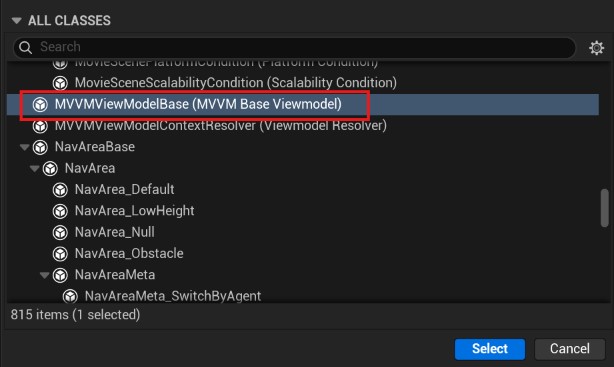
-
Add the
Healthinteger variable, enable its Field Notify, and compile the blueprint.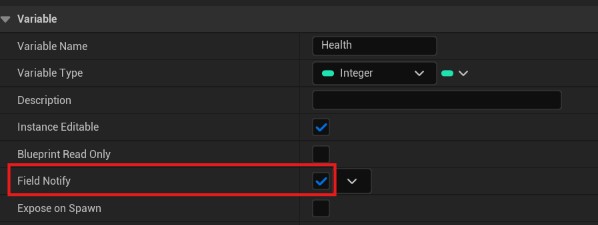
-
Set the object instance as the data context for the Markup UI page.
-
Use the
Healthcorresponding Set w/ Broadcast node to modify the value. After the node broadcasts the change, the page automatically updates, without the need to immediately call Notify Property Changed.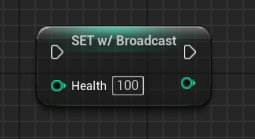
The node's display name may vary depending on the editor language; W/Broadcast indicates that this Set node will broadcast field changes.
// PlayerViewModel.h
#pragma once

#include "CoreMinimal.h"
#include "MVVMViewModelBase.h"
#include "PlayerViewModel.generated.h"

UCLASS(BlueprintType)
class UPlayerViewModel : public UMVVMViewModelBase
{
    GENERATED_BODY()

private:
    // Add FieldNotify to UPROPERTY to enable change notifications for Blueprints and UE_MVVM_SET_PROPERTY_VALUE.
    UPROPERTY(BlueprintReadWrite, FieldNotify, Getter, Setter,
        Category = "Player", meta = (AllowPrivateAccess = "true"))
    int32 Health = 80;

public:
    int32 GetHealth() const
    {
        return Health;
    }

    void SetHealth(int32 Value)
    {
        // Use this macro to update Health and broadcast a notification.
        // Assign and broadcast a Health notification only when the value changes.
        UE_MVVM_SET_PROPERTY_VALUE(Health, Value);
    }
};
The business code updates the value using a setter method:
// PlayerViewModel is the UPlayerViewModel instance assigned to the page.
PlayerViewModel->SetHealth(60);
UE_MVVM_SET_PROPERTY_VALUE Check for changes, assign values, and broadcast them. When only notifications are needed, this can be done within the ViewModel. UE_MVVM_BROADCAST_FIELD_VALUE_CHANGED(Health) For specific interfaces, please refer to the official API of UMVVMViewModelBase. Ordinary properties can still be bound..
Precautions
- Applicable Objects:
UE_MVVM_SET_PROPERTY_VALUEis used in the ViewModel notification system for UObject. It relies on the helper functions and field descriptions provided byUMVVMViewModelBase. Ordinary C++ classes cannot directly use this function. - Assigning Values and Notifying: It is necessary to use the
UE_MVVM_SET_PROPERTY_VALUEmacro to assign values to fields and send notifications of changes. Ordinary assignments do not trigger notifications of changes. - Avoiding Duplicate Notifications: When the same change is already notified through the FieldNotify broadcast, there is no need to call the property notification function of the Markup UI again.
- Attributes without FieldNotify can continue to be used. Attributes with no FieldNotify should still be used.Property change notifications.