Resource Paths
Resource paths locate the CSS, images, and fonts referenced by an HTML page. Use the original paths within the asset hierarchy.
Design-Time Directory and Asset Directory
- The Design-Time Directory stores source HTML, CSS, images, and fonts for UI designers to edit.
- The Asset Directory stores assets synchronized into the engine project. Developers reference these assets for editor previews, UI integration, and runtime loading.
During synchronization, keep each file’s path relative to the Design-Time Directory so it matches the logical path in the Asset Directory.
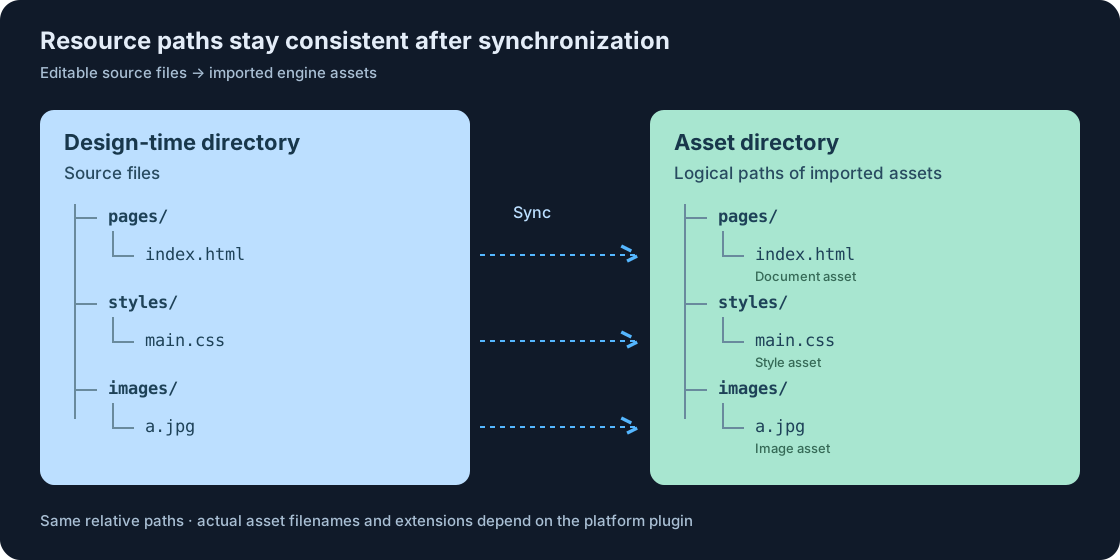
The diagram shows logical paths on the right. The platform plugin handles the engine asset names and file extensions. In page sources, continue to use paths such as pages/index.html, styles/main.css, and images/a.jpg.
The Design-Time Directory and Asset Directory can have different names and disk locations. Keep the relative paths inside them consistent.
Asset Lookup During Preview and Runtime
Asset previews and the runtime load assets only from the configured Asset Directory. If an asset is missing, synchronize it from the Design-Time Directory.
Root Paths
For asset previews and runtime loading, a path that starts with / resolves from the globally configured Asset Directory. All pages share this setting.
<img src="/a.jpg" alt="Image">
Use /a.jpg for a.jpg directly in the Asset Directory. Use /images/a.jpg if the file is in its images subdirectory.
| The path within the page | The logical location in the Asset Directory |
|---|---|
/a.jpg |
Asset Directory/a.jpg |
/images/a.jpg |
Asset Directory/images/a.jpg |
/styles/main.css |
Asset Directory/styles/main.css |
A root path resolves independently of the location of the referring HTML or CSS file. For example, /images/a.jpg refers to the same asset from pages/index.html and pages/menu/index.html.
Root Path Scope
/ refers only to the globally configured Asset Directory. The Design-Time Directory is the source for editing and synchronization.
Relative Paths
A path without a leading / resolves from the directory of the file that references the asset.
In this example, the HTML file is at pages/index.html.
| Reference path | Resolved path |
|---|---|
a.jpg or ./a.jpg |
pages/a.jpg |
images/a.jpg |
pages/images/a.jpg |
../images/a.jpg |
images/a.jpg |
/images/a.jpg |
images/a.jpg, directly retrieved from the Asset Directory |
Use .. to move up to the parent directory, within the bounds of the Asset Directory.
Resource Paths in CSS
When HTML references CSS, the path is relative to the HTML file. For example, pages/index.html references the style sheet through ../styles/main.css.
<!-- pages/index.html -->
<link rel="stylesheet" href="../styles/main.css">
When external CSS references images or fonts, the path is relative to the CSS file itself. For example, styles/main.css references the image through ../images/a.jpg.
/* styles/main.css */
.banner {
  background-image: url("../images/a.jpg");
}
In these examples, the HTML reference resolves from pages/ and the CSS reference resolves from styles/.
Use url("/images/a.jpg") to resolve the image from the configured Asset Directory, regardless of the stylesheet location.
Maintain Resource Paths
- Use
/as the directory separator to keep the file names and case consistency. - After moving HTML or CSS, check their relative references. After moving resources, check all reference locations.
- After modifying the design file, re-synchronize the assets to avoid updating only the document while missing styles, images, or fonts.
- Use paths that resolve within the
Asset Directoryon every target machine.
For detailed information, please refer to the documentation for each platform.