Basic Concepts
Markup UI uses HTML documents to describe the interface structure, and CSS to set the layout and styles. The images, fonts, and other files referenced on the page, along with the document itself, constitute the interface resources. These resources are loaded by the platform plugin and displayed in the interface controls of the engine.
| Concepts | Meaning |
|---|---|
| HTML Documents | Define elements, text, and the source files that reference resources. |
| CSS Style Sheets | Files that define styles such as element layout, size, color, and font |
| Resources | Files containing style sheets, images, fonts, etc. used on the page |
| Page instances | The runtime interface generated after the document is loaded, with the current display and interaction states |
| Data Context | Business data objects provided for use in page binding |
| Platform plugins | Integrate page resources, display controls, and input operations with the engine's integration components. |
SDK and platform plugins
The Markup UI SDK provides comprehensive capabilities for HTML/CSS handling, layout, rendering, data binding, and interaction. Unreal Engine and Unity platform plugins utilize the native rendering systems of their respective platforms, and integrate with the engine's editor, assets, and interface systems. Ordinary apps can use the SDK to connect to custom rendering backends, such as Skia, without relying on the game engine.
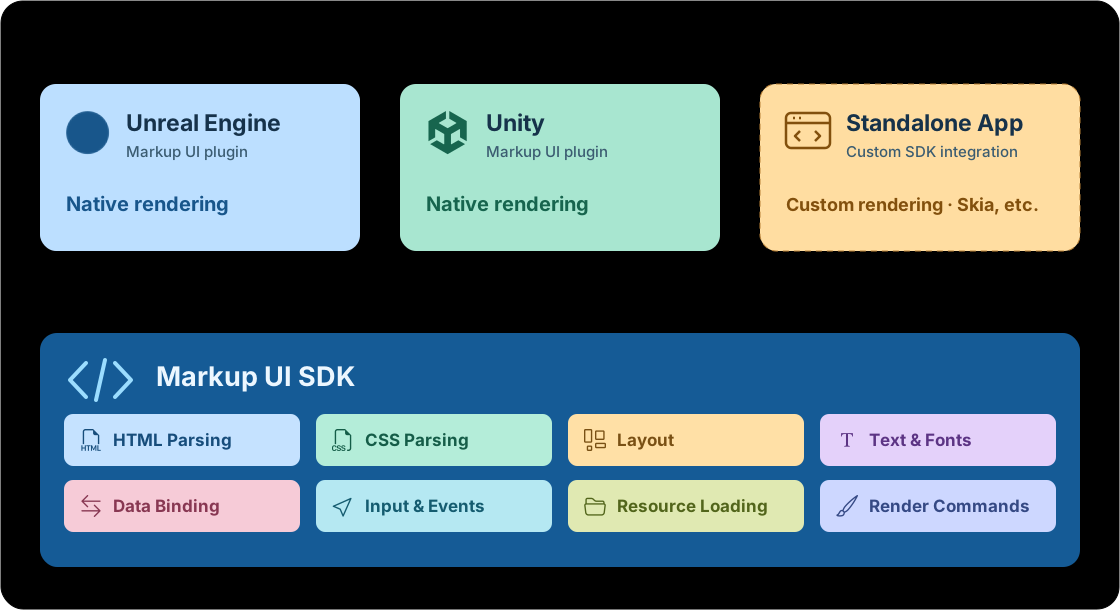
The ordinary app branch in the diagram indicates integration based on the SDK itself. It does not indicate that corresponding application framework plugins have been provided.
HTML documents and page instances
HTML documents define the content of an interface. For example, a player information panel can include a avatar, character name, health value, and operation buttons. The arrangement and appearance of elements are controlled by CSS.
Documents and page instances are different objects: Documents store interface definitions, while page instances store the state of the interface after loading. The same document can be used to create multiple page instances. Referring to the same document should not be interpreted as sharing the scroll position, input content, or focus.
Resource updates occur after modifying the source file.
When loading a page using project assets, it is necessary to update the corresponding assets and reload the page after modifying the source file. The method of updating disk files is specified by the platform plugin. Modifying the source file does not mean that the running page will automatically refresh.
CSS style sheets, images, and fonts
A page usually consists of multiple files. The following is a simple Design-Time Directory:
ui/
  pages/
    player.html
  styles/
    player.css
  images/
    avatar.png
  fonts/
    ui-font.ttf
In this example, player.html defines the structure of the player panel, player.css sets the styles, and the other two directories store the avatar and fonts respectively. The paths in the page must match the actual resource locations.1
The relative references in the document are based on the directory where the document is located. For example, when referring to the style sheet pages/player.html, you can use ../styles/player.css. The relative paths within the style sheet are based on the directory where the style sheet is located.
with / For path rules, please refer to the relevant documentation. Asset Directory. 2 For resource paths, please refer to the corresponding documentation.Resource Paths.
Design files and project assets
Design files are HTML, CSS, and other source files that are maintained outside of the editor. Project assets are resources imported through platform plugins or synchronized into the engine project.
The editor preview and the game use the resources configured for them respectively.
Ensure that resources have been imported before packaging.
Just because source files exist on the disk does not mean they have been imported into the project or included in the final build. Before packaging, make sure that pages, style sheets, images, and fonts have been included in the resource construction process of the platform plugin. Otherwise, there may be issues with loading pages or dependent resources.
Page size and display area
The host control in the engine provides a display area for the page. HTML elements are arranged using CSS within this area. The final display result is determined by both the content of the page and the size of the display area.
- Display area size: The control can be used to determine the width and height of the page that will be displayed.
- Element size: The size of the elements determined by CSS and the layout results.
- DPI and scaling: This affects the relationship between the logical size and the actual screen pixels.
Adjusting the size of the control does not mean changing the fixed size of all elements. When adapting to different windows or resolutions, it is necessary to consider both the page layout and the settings of the host control. For detailed instructions, see Layout and Sizing and DPI and Scaling.
Data context and interaction
Static pages can directly display text and images in HTML. When it is necessary to display runtime data such as character names, health values, or item lists, the data context can be used to provide business objects to the page. Then, data binding can be used to associate object properties with text, element properties, or styles.
Data binding also involves update notifications: After business data is modified, the interface should be updated using the notification methods provided by the platform. It cannot be assumed that the page will be refreshed just based on a single property assignment.
Events are used to represent interactions such as clicks and inputs. Commands are used to call business operations. For example, the click event of a button can be associated with a "select item" command, and the current item can be passed as a parameter.
Related explanations: Data Context, Data Binding Overview, Events and Commands.
Platform integration
HTML, CSS, and resource paths describe the page itself. Platform plugins are responsible for integrating the page with the engine's asset management, interface controls, and input systems.
Use the Markup UI controls in UMG to display the page. After the documentation and related assets are imported into the project, they can be previewed in the editor. When the source files are modified, the assets need to be updated by re-importing them.
Use the page elements in the UI Toolkit to display the page. After the design files are synchronized to the configured Asset Directory, you can open the HTML asset for previewing.
Support for platform functions
The support for data binding, available events, input rewriting, and editor functions varies by platform. The concepts and syntax described in the common section do not indicate that all features have been implemented in both UE and Unity.
-
This directory is used only to illustrate the reference relationships between files. The directory name is not fixed, and it does not mean that files will automatically be imported into the engine project. ↩
-
The
Asset Directoryhere is configured by the platform plugin. It is not the root directory of the operating system, nor is it a global entry point for finding any resources in the engine project. ↩