Property Binding
Markup UI natively supports binding observable objects to the UI, updating the interface when properties or collections change. For detailed usage, see Observable Objects and Collections.
In Unreal Engine, it is also possible to use native UObject as the data context for the page, binding its reflective properties, including values, strings, object references, USTRUCT, as well as native collections like TArray, TMap, TSet, etc. The basic concept of data context can be found in Data Context.
The scope of property binding support
The data context can be either existing UObject, Actors, or other UObject derived objects, or it can be a blueprint object. Markup UI reads properties through Unreal Engine's reflection system; C++ fields need to be declared as UPROPERTY, while in blueprints, object variables can be used.
UPROPERTY
For example, declare the following properties in the object:
UPROPERTY(EditAnywhere, BlueprintReadWrite, Category = "Player")
int32 Health = 100;
HTML uses the property name to read its value:
<p>Health: {{ Health }}</p>
Write the binding using the actual property name. When accessing from the blueprint, use the appropriate blueprint visibility settings. Two-way binding requires that the property is writable. BlueprintReadOnly and read-only properties cannot be used as writable targets.
Get/Set UFUNCTION
In addition to variables, properties can also be provided through public Unreal reflection functions. GetHealth() corresponds to the binding name Health. The optional SetHealth(...) allows writing back:
UFUNCTION(BlueprintCallable, Category = "Player")
int32 GetHealth() const;

UFUNCTION(BlueprintCallable, Category = "Player")
void SetHealth(int32 Value);
- Getter: Does not accept parameters and returns a value of the supported type.
- Setter: Takes one parameter, and the type of this parameter must be the same as the return type of the getter. It does not return a value.
When there is only a getter, the property is read-only. When there is only a setter and no getter, the property cannot be bound through these functions. If there is a UPROPERTY with the same name, this property will be used first.
UPROPERTY can also specify access functions through BlueprintGetter and BlueprintSetter. The property name is used for binding, and the specified functions are used for reading or writing:
UFUNCTION(BlueprintGetter)
int32 GetHealth() const;

UFUNCTION(BlueprintSetter)
void SetHealth(int32 Value);

UPROPERTY(BlueprintGetter = GetHealth, BlueprintSetter = SetHealth)
int32 Health = 100;
Methods for accessing collection properties
TArray, TMap, and TSet must be provided as actual properties of the object. Getters that return copies of the collections cannot be used as observable collections.
Supported data types
| Unreal Engine types | Reading methods | Written back through binding |
|---|---|---|
bool |
Boolean values | Supported when properties are writable |
int8, int16, int32, int64 |
Signed integers of corresponding width | Supported when properties are writable |
uint8, uint16, uint32, uint64 |
Unsigned integer corresponding to the width | Supported when properties are writable |
float, double |
Floating-point numbers | Supported when properties are writable |
FString, FText, FName |
Strings | Supported when properties are writable |
| Enumerations | Underlying integer values | Supported when properties are writable |
UObject*, TObjectPtr<T>, TWeakObjectPtr<T> |
Objects, which can continue to access their reflective properties | Does not support replacing object references. The writable scalar properties of the objects themselves can be written back |
USTRUCT |
Structural value. Its reflective members can be accessed further. | The structure and its members are all read-only. |
TArray<T>, TMap<TKey, TValue>, TSet<T> |
Native collection. Elements can be traversed or read in supported ways. | Overall assignment is not supported. Send collection notifications after game code modifications. |
TOptional<T> |
Reads the internal value when it has a value. Returns null if not set. | Supports writing to writable scalars internally. Writing null can clear the value. |
Scalar write-revert is still subject to the restrictions of attribute writability and Getter/Setter configurations. The internal type of TOptional<T> cannot be a collection or structure. Soft object references and delegates do not support attribute binding.
USTRUCT
USTRUCT It is a value type, not an independent entity. UObject When binding, the following points need to be noted:
- Member Reading: Use paths like
Profile.Level; Custom structures must be declared asUSTRUCT, and members that are bound for reading must be declared asUPROPERTY. - Read-Only Access: Structures and their members do not support bidirectional writing. This applies even when the members are declared as
BlueprintReadWrite. - Change Notification: After modifying a member, it notifies the entire structure property of the associated UObject, such as
Profile, rather than sending a notification forProfile.Level. - Collection Elements: When modifying the structure elements in arrays or dictionaries, notify the replacement of that element.
- Built-in Structures: Structures such as
FVector,FColor,FLinearColor, etc., are also read as structures. They follow the same rules for read-only access and notification.
For example, define a structure that contains levels, and use it as a property of the data object:
USTRUCT(BlueprintType)
struct FPlayerProfile
{
    GENERATED_BODY()

    UPROPERTY(EditAnywhere, BlueprintReadWrite, Category = "Player")
    int32 Level = 1;
};
Declare in the data object class:
UCLASS(BlueprintType)
class UPlayerData : public UObject
{
    GENERATED_BODY()

public:
    UPROPERTY(EditAnywhere, BlueprintReadWrite, Category = "Player")
    FPlayerProfile Profile;
};
Read HTML by member path:
<p>等级:{{ Profile.Level }}</p>
After modifying a member in the game code, send a notification to Profile:
#include "Binding/UObjectBinding.h"
#include "PlayerData.h"

PlayerData->Profile.Level = 2;
MarkupUI::Binding::NotifyPropertyChanged(
    PlayerData, GET_MEMBER_NAME_CHECKED(UPlayerData, Profile));
After modifying a structural member in the blueprint, also call Notify Property Changed, connect the Object to the data object, and set Property Name to Profile.
Sources of notifications for complex structures
Taking Layers[0].Entries['main'].Children[0].Child.Health as an example. Layers is an array property on the data object, Entries and Children are collections within the structure, and Child refers to the UObject referenced by the structural member. Select the notification based on the actual location of the modification.
| Modify | Notification source |
|---|---|
Modify Child.Health |
Send the Health property notification to Child. |
Replace the Child reference in the structure members, or modify the content of Entries and Children. |
Notify the Layers on the data object. If this operation is submitted as a replacement for the outer array items, you can use BeginArrayReplace and EndArrayReplace for Layers. |
Add, delete, or replace elements of Layers. |
Send the corresponding set notification to the original Layers array. After clearing or batch rebuilding, you can send NotifyArrayReset. |
Modify the revert property of the Child object. |
Send collection notifications to the original collection on Child. For example, use BeginMapAdd and EndMapAdd when updating the keys in its Scores property. |
The native collection embedded in the structure is refreshed through notifications from its object properties or outer collection items. The modifications and notifications are performed on the game thread. The Notify Property Changed node in the blueprint receives the object that sent the notification and its direct property names, such as Health on Child, or Layers on the data object.
When the index or key along the path is deleted, the text binding will display a null value. After reattaching the item and sending a notification, the text binding and the corresponding @for list will be updated according to the current data. After replacing the reference, the path will be read from the new object.
In the example below, PlayerData represents an existing data object. Assume it has properties such as Health, Items, Scores, and Tags.
Set the data context
- Create or obtain a data object, and use a variable to store this object.
- Obtain a reference to the MarkupUI Widget, and call Set Data Context.
- Connect the data object to the Data Context, and set the Reference Mode as needed.
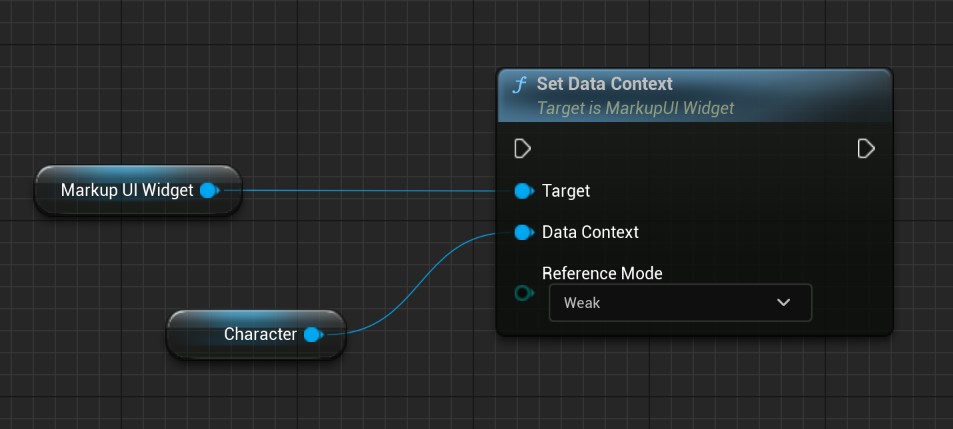
Pass the existing object to MarkupUIWidget:
#include "UMG/MarkupUIWidget.h"
#include "PlayerData.h"

// Widget and PlayerData point to the existing MarkupUIWidget and data object.
Widget->SetDataContext(PlayerData);
The data context can be set before or after opening the page.
Object lifecycle
Reference Mode supports the following reference methods:
- Weak (default):
MarkupUIWidgetdoes not prevent data objects from being garbage collected. It is recommended that other objects in the game hold the data objects through valid Unreal references, ensuring that the objects remain valid during the use of the page. - Strong:
MarkupUIWidgetholds strong references to data objects, preventing them from being garbage collected. When the context is cleared or replaced with other objects, the holding of this context is updated accordingly.
Named data context
Use Set Named Data Context or C++’s SetNamedDataContext to set a named context:
Widget->SetNamedDataContext(TEXT("player"), PlayerData);
In the page, select it using @context="player". Use Reset Data Context to clear the default context, and use Reset Named Data Context to clear the context with a specified name. The name must be consistent with the notation used in the page.
Native collection
The collections declared as UObject properties can be used directly for binding:
| Unreal Engine types | Uses in binding |
|---|---|
TArray<T> |
An ordered list, where elements can be accessed by index |
TMap<TKey, TValue> |
Accessing key-value pairs or traversing key-value pairs |
TSet<T> |
Traversing non-repeating elements. Index access is not supported |
The elements of the collection must be types supported by the binding mechanism. Native collections cannot be nested within them. The keys of TMap support string and integer types. For the syntax of collection binding, see Collection Binding.
The collection must be an actual property of the object
Declare the collection as a reflective property on the object, and operate on that property itself. The getter of the collection copy cannot provide the observable original collection. A copy cannot replace the original collection when sending notifications.
Property change notification
After modifying the data object through game code or blueprints, it is necessary to send a property change notification so that the property can be read again after binding to the page. The current value is read during the first binding, and there is no need to send a notification in advance for initial assignment.
FieldNotify
Objects that support FieldNotify send field broadcasts, and the plugin automatically updates the corresponding bindings, eliminating the need to send manual notifications repeatedly. For the integration steps and C++ / blueprint examples, see UMG Viewmodel.
Manual notification
- Use the regular Set node to modify variables of the data object, such as
Health. - Call Notify Property Changed after assignment.
- Connect the same data object to Object, and set Property Name to
Health.
The property name should be consistent with the actual name of the variable. When sending notifications to other objects, connect Object to the object that actually holds the property.
For example, after modifying the character's position, the ActorLocation property can be notified of the change:
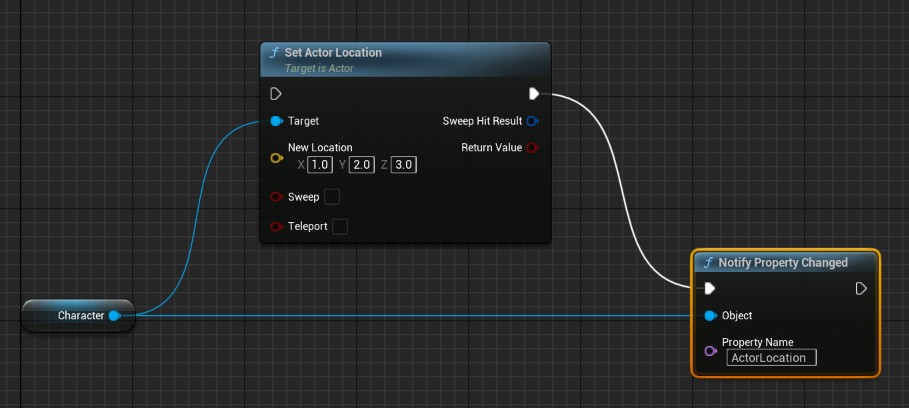
After updating the property, call MarkupUI::Binding::NotifyPropertyChanged:
#include "MarkupUISdk.h" // Markup UI SDK and Unreal Engine binding APIs.
#include "PlayerData.h"

// PlayerData points to the data object in use by the page.
PlayerData->Health = 80;
MarkupUI::Binding::NotifyPropertyChanged(
    PlayerData, GET_MEMBER_NAME_CHECKED(UPlayerData, Health));
GET_MEMBER_NAME_CHECKED uses C++ member names for easier compile-time checking. Please specify the property that has changed.
Collection change notification
Directly calling ordinary modification operations on TArray, TMap, or TSet will not automatically notify the page. When modifying a bound collection, use the collection operations provided by the plugin, or send the corresponding notifications during the modification process.
Collection notifications are divided into the following types:
- Add (
Add) Create and display the added element, while keeping the other elements intact. - Delete (
Remove): Removes the UI for the corresponding element, while keeping the other elements intact. - Replace (
Replace) Update the UI corresponding to the replaced element, while keeping the other elements intact. - Move
Move) Adjust the display position of the corresponding element. - Reset (
Reset) Read the entire collection again and refresh the list.
TSet uses set reset notifications
TSet It is an unordered collection, where elements have no fixed positions. Adding or removing elements may also change the traversal order. Therefore,TSet When the content changes, send a notification for resetting the collection. The binding will read the entire collection again, rather than reporting the addition or removal of individual elements based on indices. If you need to maintain the list order or update elements based on their positions, please use TArray.
C++
When using the observable collection provided by the SDK, you can modify the content through the collection's own operation interface, thereby sending notifications without having to call the notification function again. The specific collection type in C++ is ObservableArray<T>, ObservableMap<TKey, TValue> and ObservableSet<T>.
#include "CoreMinimal.h"
// Include the Unreal Engine SDK header for Unreal type adapters and compile-time type checking.
#include "MarkupUISdk.h"

// Store the observable collection in the C++ data model used by the page.
TArray<int32> InitialNumbers{10, 20};
MarkupUI::Binding::Modeling::ObservableArray<int32> Numbers =
    MarkupUI::Binding::Modeling::ObservableArray<int32>::From(
        MoveTemp(InitialNumbers));
Numbers.Add(30);
Numbers.Set(0, 15);
Numbers.RemoveAt(1);
This method is used for the C++ data model of the SDK. These types cannot be declared as UPROPERTY in Unreal Engine. The TArray, TMap, and TSet properties on objects can be used in the following two ways. For the complete usage, see Observable Objects and Collections.
MarkupUI::NotifyCollection::From is used for the Unreal Engine native collections TArray, TMap, and TSet on objects. It automatically sends notifications when modifications are performed, eliminating the need for manual notification again.
#include "MarkupUISdk.h"
#include "PlayerData.h"

// PlayerData->Items: TArray<FString>
// PlayerData->Scores: TMap<FString, int32>
// PlayerData->Tags: TSet<FString>
// These are the original collection properties on PlayerData.

MarkupUI::NotifyCollection::From(PlayerData->Items).Add(TEXT("Potion"));
MarkupUI::NotifyCollection::From(PlayerData->Scores).Add(TEXT("Level"), 2);
MarkupUI::NotifyCollection::From(PlayerData->Tags).Add(TEXT("Ready"));
TArray and TMap Can notify the addition, deletion, or replacement of specific elements.
When directly modifying Unreal Engine's native collections such as TArray, TMap, and TSet on objects, use the notification functions in Binding/UObjectCollectionNotifications.h. The Begin function is called before modification, and the End function is called after the corresponding modification has been applied.
#include "Binding/UObjectCollectionNotifications.h"
#include "PlayerData.h"

// PlayerData->Items: TArray<FString>
// PlayerData->Scores: TMap<FString, int32>
// PlayerData->Tags: TSet<FString>
// These are the original collection properties on PlayerData.

MarkupUI::BeginArrayAdd(PlayerData->Items);
PlayerData->Items.Add(TEXT("Potion"));
MarkupUI::EndArrayAdd(PlayerData->Items);

if (PlayerData->Items.IsValidIndex(0))
{
    MarkupUI::BeginArrayRemove(PlayerData->Items, 0);
    PlayerData->Items.RemoveAt(0);
    MarkupUI::EndArrayRemove(PlayerData->Items);
}

const FString Key = TEXT("Level");
MarkupUI::BeginMapAdd(PlayerData->Scores, Key);
PlayerData->Scores.Add(Key, 2);
MarkupUI::EndMapAdd(PlayerData->Scores);

PlayerData->Tags.Add(TEXT("Ready"));
MarkupUI::NotifySetChanged(PlayerData->Tags);
For array replacements, use BeginArrayReplace / EndArrayReplace. For dictionary deletions, use BeginMapRemove / EndMapRemove. The array indices, quantities, and dictionary keys must match the actual modifications made. After clearing the array or dictionary, call NotifyArrayReset or NotifyMapReset respectively.
Modifications and notifications of Unreal Engine's native collections should be performed on the game thread, and the bound original collections should always be operated on.
Blueprint
In the blueprint, select the collection modification nodes with the suffix (Markup UI), such as the Add (Markup UI) for arrays. Connect the target to the collection properties of the data object. The node performs collection modifications and sends notifications.
For specific nodes and selection methods, refer to the "Markup UI Blueprint Extension Nodes" below.
Object properties and collection changes
When modifying the properties of objects in a collection, notify the properties of that object. When adding or removing elements from a collection, notify the collection of changes. These two types of notifications cannot be replaced with each other.
Markup UI blueprint extension node
Drag the connection from the array property pin. You can select the operation with the suffix (Markup UI) in Markup UI → Array:
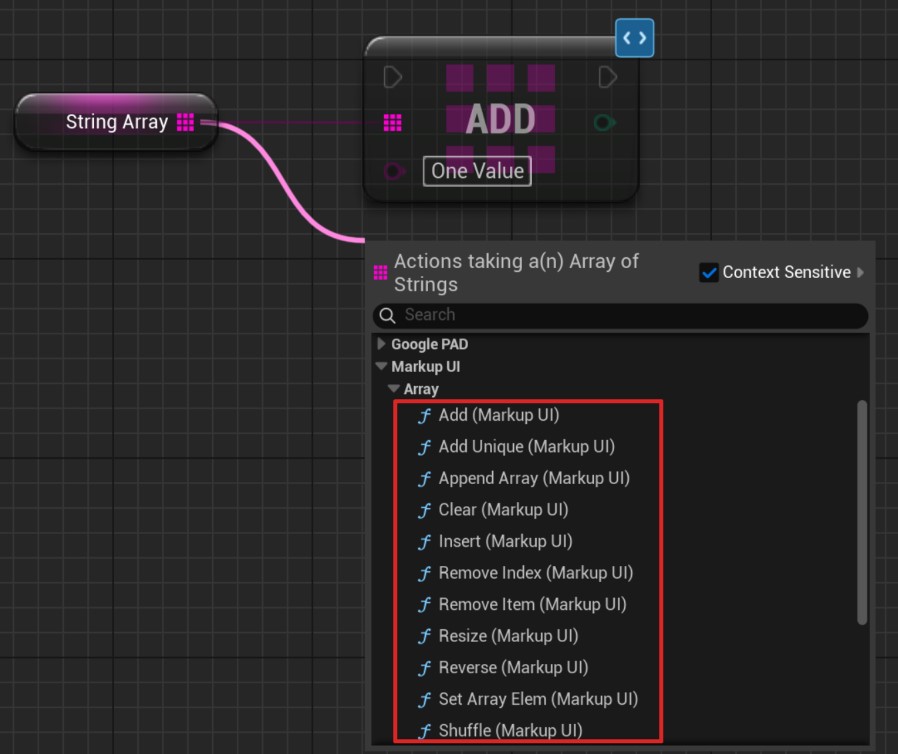
Use the nodes with the suffix (Markup UI) for TMap and TSet. These nodes require operating on the original collection property of the object. Do not use the function results that return copies.
The Markup UI node has a blue marker in the upper right corner, used to distinguish it from Unreal Engine's native collection nodes. In the figure below, the upper node sends notifications when the collection is modified. The lower native node only modifies the collection and does not send Markup UI notifications automatically.
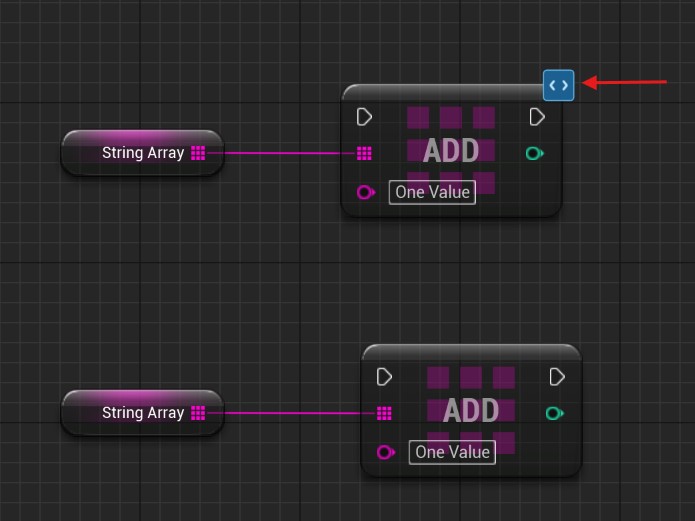
- Obtain the
Itemsproperty from the data object and connect it to the Target Array of the array node. - Provide the elements to be added for Add (Markup UI).
- After executing this node, the bound list will receive notifications of changes in the collection.
Array Node
| Node | Function |
|---|---|
| Add (Markup UI) | Add an element at the end |
| Add Unique (Markup UI) | Add an element when the element does not exist |
| Append Array (Markup UI) | Add elements to another array |
| Clear (Markup UI) | Clear the array |
| Insert (Markup UI) | Insert elements at a specified index |
| Remove Index (Markup UI) | Remove elements at a specified index |
| Remove Item (Markup UI) | Remove matching elements |
| Resize (Markup UI) | Adjust the length of the array |
| Reverse (Markup UI) | Reverse the order of elements |
| Set Array Elem (Markup UI) | Set the elements with the specified indices |
| Shuffle (Markup UI) | Randomly shuffle the elements |
| Shuffle from Stream (Markup UI) | Shuffle the elements using a random stream |
| Swap Array Elements (Markup UI) | Exchange the elements at two positions |
Map node
| Node | Function |
|---|---|
| Add (Markup UI) | Add key-value pairs, or update the values of existing keys |
| Remove (Markup UI) | Delete the key-value pairs with the specified keys |
| Clear (Markup UI) | Clear the dictionary |
Set node
| Node | Function |
|---|---|
| Add (Markup UI) | Add elements |
| Add Items (Markup UI) | Add elements to an array |
| Remove (Markup UI) | Remove a specified element |
| Remove Items (Markup UI) | Remove a specified element from the array |
| Clear (Markup UI) | Clear the collection |
The Array and Set nodes are generated by the collection functions provided by the current Unreal Engine version. The specific nodes available may vary depending on the engine version. The above names are referenced based on Unreal Engine 5.8. When reading collections, you can use Unreal Engine's native query nodes.
Set operation node
The (Markup UI) versions of Difference, Intersection, Union, and To Array cannot be used as automatic notification nodes at present: these nodes do not have the required Target Set input. When calculating the results of collections, please use Unreal Engine's native nodes, and then update the bound data through supported collection modification operations.