Triggers
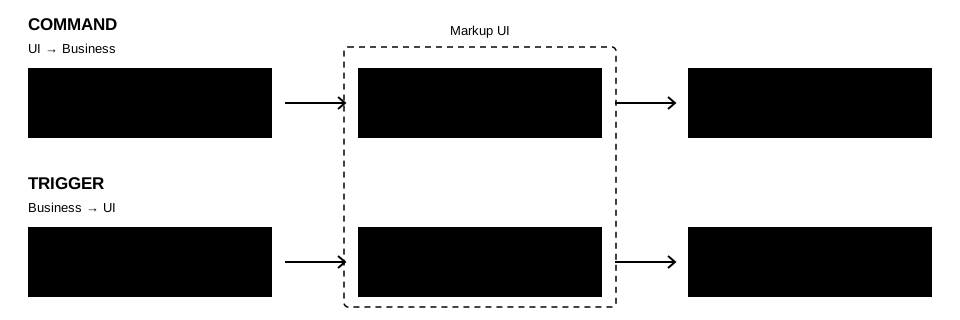
Commands and triggers are used to connect the UI with business code. The difference lies in the point of notification:
- Commands: UI events notify the business code to execute logic. For example, when a user clicks the save button, the save operation is executed through the bound command.
- Triggers: Business code notifies the UI to execute the actions declared in HTML. For example, after the application receives the "open backpack" input action, it triggers the UI update, replacing the CSS class of the backpack element.
The input actions, task completion, or other business events in the application do not necessarily come from HTML elements. When you need to drive UI behavior based on these events, you can use triggers to connect the source of the events with the actions declared in the page. Triggers can update element properties or execute commands bound to the page.
Syntax
Use @trigger to declare triggers. The expression consists of three parts: name, parameters, and behavior.
- Name:
namespecifies the trigger that has been registered. - Parameters:
parameter={...}stores the custom parameters of the trigger. Multiple string parameters can be included. - Behavior: Declare the behavior to be executed after the trigger is triggered using the
do:prefix.
<!-- name holds the registered trigger name. -->
<!-- The outer parameter passes a custom argument to the trigger. -->
<!-- The parameter in do:command passes an argument to Save. -->
<section @trigger="{
    name='mytrigger',
    parameter={param1='value1', param2='value2'},
    do:command={Save, parameter={Name, Age, Selected}},
    do:class={value='active', op='append'}
}">
    <p>{{ Status }}</p>
</section>
In non-inline notation, custom parameters and behavior can be separated into separate properties.
<section
    @trigger="{name='mytrigger'}"
    @trigger.parameter="{param1='value1', param2='value2'}"
    @trigger.do.command="{Save, parameter={Name, Age, Selected}}"
    @trigger.do.class="{value='active', op='append'}">
    <p>{{ Status }}</p>
</section>
Both notations are equivalent. In non-inline notation, custom parameters are declared using @trigger.parameter, and behavior is declared using @trigger.do.command or @trigger.do.class. The same configuration item or behavior can only be declared once.
The name of the trigger must be written in the main property.
Even if the parameters and behaviors are separated into independent properties, the name must be declared in the value of the @trigger property. For example, @trigger="{name='mytrigger'}". @trigger.name is not a valid trigger property.
Trigger parameters
- A trigger can define multiple parameters.
param1,param2are just example names. The actual parameter names, meanings, and validation rules are defined by the specific trigger. - Parameters only accept string literals, such as
param1='value1'. The syntax also allows omitting single quotes. In this example, single quotes are retained uniformly. - Parameters do not support data binding, property path evaluation, or other binding expressions. They will not be updated as the data context changes.
Behaviors
Behaviors declare the actions that are executed after triggering. do:command and do:class are executed by the SDK and are not passed as custom parameters to the trigger.
Each behavior belongs to the current element that declares @trigger. Behaviors that update element properties only modify that element itself. For example, do:class does not modify the parent element, child elements, or any other elements that have the same trigger declared. do:command, on the other hand, searches for commands within the effective data context of that element. The impact of the business code execution is determined by the command itself.
Behavior data context
The binding expressions in the behavior follow the data context and scope rules of the current element. When no naming context or alias is specified, command paths, command parameters, and property bindings are resolved from the default data context of the current element. This context can be inherited by ancestor elements or specified through @context.
For example, assume that mytrigger has been registered, and the naming context player provides the Save command and Name property:
<section @context="player">
    <input
        @value="{Name}"
        @trigger="{
            name='mytrigger',
            parameter={param1='value1'},
            do:command={Save, parameter={Name}},
            do:class={value='saved', op='append'}
        }">
</section>
When the trigger corresponding to this <input> is triggered:
- The
playerdata context inherited from the<input>is used to read theSaveandNameproperties. - The
Savemethod is called, and the readNamevalue is used as a command parameter. The parameter comes from the data context, not from directly reading the DOM value of the input field. - Append the
savedattribute to theclassproperty of the<input>. If this attribute already exists, append it again without duplication. The parent<section>is not affected by this attribute update.
The command and binding values are read again every time it is triggered. When accessing other contexts, you can use the declared named context or scope alias in the expression. For more details, see Data Context.
Behaviors supported by the SDK
| Behaviors | Purpose | Revert |
|---|---|---|
do:command |
Executes the bound command. Reads the command and parameters again every time it is triggered | |
do:class |
Appends or replaces the CSS class of the element when activated. Restores the state before activation when deactivated |
The trigger conditions and recovery rules for revert are described in the Revert section at the end of this article.
Command behavior
do:command can execute commands within the current element's data context, or it can invoke registered Global Commands:
{Save, parameter={Name}}: Searches forSavewithin the current data context and retrievesNameas a parameter.{@sys.PlaySound, parameter={'open'}}: Searches forPlaySoundfrom the global registry, regardless of the current data context.
For example, assume that the mytrigger trigger and PlaySound global command have been registered:
<section @trigger="{
    name='mytrigger',
    do:command={@sys.PlaySound, parameter={'open'}}
}"></section>
The parameters of global commands can also come from the current element's data context, such as {@sys.PlaySound, parameter={SoundName}}. The source of commands and parameters is parsed separately. Using @sys does not change the data context of the parameters.
Class behavior
Use value to specify the CSS class, and op to specify the operation. If op is omitted, the default value is 'append'.
| Field | Purpose |
|---|---|
value |
Required. A string literal or binding expression, such as 'active' or {ActiveClasses} |
op |
'append' appends an existing class name; 'replace' replaces the entire class attribute |
For example, the element originally has the panel class. The trigger configuration is as follows:
<section class="panel" @trigger="{
    name='mytrigger',
    do:class={value='active', op='append'}
}"></section>
After calling Activate(), the element retains the panel class and appends the active class. Only the HTML attributes after the behavior update are shown below:
<section class="panel active"></section>
If the operation is changed to op='replace', the original panel will be removed after activation. The result is as follows:
<section class="active"></section>
Both operations will return to the state before activation after calling Deactivate():
<section class="panel"></section>
The binding in value is only evaluated during Activate(), and no persistent subscription is established. op is a fixed string, and binding expressions are not supported. Abbreviations for strings and single expressions are still available, such as do:class='active'.
revert will replace the entire property
op='replace' will replace all the CSS classes of the element. By default, op='append' preserves the original classes and adds unique class names separated by blanks.
The outer parameter configures the trigger parameters. The parameter inside do:command configures the command parameters. The two have different purposes. The command path, scope, and parameter types follow the rules of Events and Commands.
Implementing triggers
The following implementation registers a trigger named input, which receives a string parameter action. The corresponding HTML is as follows:
<section @trigger="{
    name='input',
    parameter={action='inventory.open'},
    do:command={Save, parameter={Name, Age, Selected}},
    do:class={value='inventory-open', op='append'}
}">
    <p>{{ Status }}</p>
</section>
Both input and action are defined in this example and can be replaced with the actual trigger name and parameter for the project.
Each element that actually uses the trigger has an independent instance, including elements created through conditional branches and set loops. The implementation is divided into three parts: event source, trigger, and factory.
- Event source: Provides application or engine events. The following examples use replaceable event sources.
- Trigger: The
Attach()method verifies the parameters and subscribes to events. The event callback callsActivate(), andDetach()cancels the subscription. - Factory: Implements
ISyntaxTriggerFactoryto create independent triggers for each element.
Subscribing to and triggering in the data thread
The creation by the factory, as well as the Attach(), Detach(), and Activate() operations, all occur within the data thread configured in the document. When host events come from other threads, they are first scheduled to this data thread, and then the events are published.
Assume that the business system has provided the following event sources. Only the header file declarations are listed here. The subscription management and event distribution are implemented by the business system, and all calls are executed within the data thread.
// input_events.h
#pragma once

#include <cstdint>
#include <functional>
#include <string>

namespace Example
{
    class InputEvents final
    {
    public:
        // Subscribe to the specified action and return a token for unsubscribing.
        uint64_t Subscribe(
            std::string action,
            std::function<void()> callback);

        void Unsubscribe(uint64_t token);

        // Publish the action to invoke matching subscriber callbacks.
        void Publish(const std::string& action);
    };
}
Triggers (input_trigger.h):
// input_trigger.h
#pragma once

#include "input_events.h"

#include <cstdio>
#include <markupui/binding/syntax/syntax_trigger.h>

#include <memory>
#include <string>
#include <utility>

namespace Example
{
    class InputTrigger final
        : public MarkupUI::Binding::Syntax::ISyntaxTrigger
    {
    public:
        explicit InputTrigger(std::shared_ptr<InputEvents> events)
            : Events(std::move(events))
        {
        }

        // Keep noexcept and return false on expected failures.
        bool Attach(
            const MarkupUI::Binding::Syntax::SyntaxTriggerContext& context,
            const MarkupUI::Binding::Syntax::SyntaxArguments& arguments)
            noexcept override
        {
            Detach();

            MarkupUI::StringView action;
            if (!arguments.TryGetString(
                    MARKUPUI_STR_VIEW("action"), action)
                || action != MARKUPUI_STR_VIEW("inventory.open"))
            {
                context.ReportError(
                    MARKUPUI_STR_VIEW(
                        "action must be 'inventory.open'."));
                return false;
            }

            MarkupUI::Binding::Syntax::SyntaxTriggerRef trigger =
                context.GetTrigger();

            if (!trigger.IsValid())
            {
                return false;
            }

            // The argument view is valid only during Attach. Copy the name when subscribing.
            std::string actionName(action.Data, action.Size);

            SubscriptionToken = Events->Subscribe(
                std::move(actionName),
                [trigger]()
                {
                    // This code already runs on the data thread.
                    // The SDK executes the actions declared in the HTML.
                    if (!trigger.Activate())
                    {
                        std::fputs("Trigger is unavailable; actions were not submitted.\n", stderr);
                    }
                });

            return true;
        }

        // Keep noexcept and handle exceptions within cleanup.
        void Detach() noexcept override
        {
            const uint64_t token = SubscriptionToken;
            SubscriptionToken = 0;

            if (token != 0)
            {
                Events->Unsubscribe(token);
            }
        }

    private:
        std::shared_ptr<InputEvents> Events;
        uint64_t SubscriptionToken = 0;
    };
}
Factories (input_trigger_factory.h):
// input_trigger_factory.h
#pragma once

#include "input_trigger.h"

#include <markupui/binding/syntax/syntax_trigger_factory.h>

#include <memory>
#include <utility>

namespace Example
{
    class InputTriggerFactory final
        : public MarkupUI::Binding::Syntax::ISyntaxTriggerFactory
    {
    public:
        explicit InputTriggerFactory(
            std::shared_ptr<InputEvents> events)
            : Events(std::move(events))
        {
        }

        // Keep noexcept.
        MarkupUI::SharedReference Create() noexcept override
        {
            return ShareTrigger(
                std::make_shared<InputTrigger>(Events));

            // Return an empty reference on expected failures.
            // return nullptr;
        }

    private:
        std::shared_ptr<InputEvents> Events;
    };
}
Event sources:
using System;

public sealed class InputSource
{
    public event EventHandler? InventoryOpen;

    public void RaiseInventoryOpen()
    {
        InventoryOpen?.Invoke(this, EventArgs.Empty);
    }
}
Triggers:
using System;
using MarkupUI.Sdk.Binding.Syntax;

public sealed class InputTrigger : ISyntaxTrigger
{
    private readonly InputSource _input;
    private SyntaxTriggerRef? _trigger;

    public InputTrigger(InputSource input)
    {
        _input = input;
    }

    public bool Attach(
        SyntaxTriggerContext context,
        SyntaxArguments arguments)
    {
        if (!arguments.TryGetString("action", out string? action)
            || action != "inventory.open")
        {
            context.ReportError(
                "action must be 'inventory.open'.");
            return false;
        }

        _trigger = context.GetTrigger();
        if (_trigger == null)
        {
            return false;
        }

        _input.InventoryOpen += OnInventoryOpen;
        return true;
    }

    public void Detach()
    {
        // Cleanup can run after a partial Attach failure. Make it safe to call repeatedly.
        _input.InventoryOpen -= OnInventoryOpen;

        SyntaxTriggerRef? trigger = _trigger;
        _trigger = null;
        trigger?.Dispose();
    }

    private void OnInventoryOpen(object? sender, EventArgs args)
    {
        // Run on the document's data thread.
        _trigger?.Activate();
    }
}
Factories:
using MarkupUI.Sdk.Binding.Syntax;

public sealed class InputTriggerFactory : ISyntaxTriggerFactory
{
    private readonly InputSource _input;

    public InputTriggerFactory(InputSource input)
    {
        _input = input;
    }

    public ISyntaxTrigger Create()
    {
        return new InputTrigger(_input);
    }
}
The data context and parameters cannot be stored in fields or asynchronous callbacks. They should be stored in references returned by GetTrigger(), and released in Detach(). Detach() may also be called after the Attach() operation fails. Cleanup should allow for repeated execution.
In this example, it is assumed that the data context provides properties such as Name, Age, Selected, and Status, as well as commands Save that receive names, ages, and selected statuses respectively. For the definition of commands, see Events and Commands. The trigger does not need to search or execute commands on its own.
Registration and triggering
Register extensions before the page is activated, and retain the registration handle within the lifecycle management objects of the application or plugin. The name is globally registered within the SDK library instance. Registration with the same name fails.
#include "input_trigger_factory.h"

#include <markupui/binding/syntax/syntax_trigger_registration.h>

#include <memory>

std::shared_ptr<Example::InputEvents> inputEvents =
    std::make_shared<Example::InputEvents>();

std::shared_ptr<Example::InputTriggerFactory> factory =
    std::make_shared<Example::InputTriggerFactory>(inputEvents);

MarkupUI::Binding::Syntax::SyntaxTriggerRegistration registration =
    MarkupUI::Binding::Syntax::SyntaxTriggerRegistration::Register(
        MARKUPUI_STR_VIEW("input"),
        factory);

if (!registration.IsValid())
{
    // Registration failed. For example, the name may already be registered.
    return;
}
Set the data context for the document and open the page containing the aforementioned HTML. After the elements are activated, the SDK automatically calls Attach(). When an input action is received, the data thread publishes an event:
inputEvents->Publish("inventory.open");
First close the page that uses the extension, and then cancel the registration:
registration.Reset();
factory.reset();
inputEvents.reset();
The following code assumes that the SDK has been initialized. Variables should be held by the application or plugin. They cannot leave the using scope when the extension is still used on the page:
var input = new InputSource();
var registration = SyntaxTriggerRegistration.Register(
    "input", new InputTriggerFactory(input))
    ?? throw new InvalidOperationException("Trigger registration failed.");
var player = new PlayerObject();
Set the player data context for the existing document and open the page. Wait until the document is ready before publishing events. dataDispatcher is the data thread Dispatcher configured during initialization.
bool dispatched = dataDispatcher.Invoke(input.RaiseInventoryOpen);
When exiting, close the page and unregister the document. The data object is retained during the page's use.
await document.CloseAsync();
GC.KeepAlive(player);
registration.Dispose();
Trigger lifecycle
Unregister only affects subsequent searches. It does not actively stop the triggered events that have already been created.
The module containing the callback code can only be uninstalled after all pages using this trigger are closed and the instance is released.
Revert
Some interface effects only take effect during specific conditions. For example, a highlighted border appears when the mouse enters an item card, and returns to its original appearance when the mouse leaves. If there are only execution actions, it is necessary to define two separate operations: "highlight" and "unhighlight". It is also necessary to retain the original CSS classes of the card to avoid losing other styles when unhighlighting.
Revert allows the same set of behaviors to support activation and restoration: The trigger is called when the mouse enters the area. Activate() apply highlight classes. Call when leaving Deactivate() The SDK restores the state to its original state before the first activation. class There is no need to define a set of reverse class behaviors, nor is it necessary for the business code to record the original class names.
The mouse events here are subscribed by custom triggers. The host still needs to call Deactivate() in the corresponding end event, and the restoration process is handled by the SDK. For example, a prompt can be displayed while holding a button, and the button can be activated when pressed and reverts to its original state when released.
Revert requires both the trigger and the behavior to support it.
- The trigger logic must call
Deactivate()at the appropriate time. Otherwise, there will be no revert. - The behavior itself must support revert. The
classbehavior supports restoring the state before activation. Thecommandbehavior does not support revert. Even if the trigger callsDeactivate(), the command will not be executed again, and the already executed business logic will not be revoked.
Suppose the element originally has the class="panel", and the behavior is configured as do:class={value='active', op='append'}:
| Operation | The class of the element | Description |
|---|---|---|
First call to Activate() |
panel active |
Save the original state of panel, and add active |
Call Activate() again |
panel active |
Do not add it repeatedly, nor overwrite the saved original state |
Call Deactivate() |
panel |
Restore the state before the first activation. |
Call Deactivate() again. |
panel |
The state has been deactivated and will not change anymore. |
- Both
'append'and'replace'support reverting. When there is noclassproperty, remove this property after deactivation. - The
classupdate generated during normal binding during activation will not change the restored target. When deactivated and then activated again, the current state will be saved again. - Reverting only restores the
class, and does not undo the business logic executed bydo:command. Nor will the command be executed again during deactivation.
All the following calls must be executed in the data thread of the document. trigger is the trigger reference obtained and saved during Attach().
// The application event starts, such as when an input action is pressed.
trigger.Activate();

// The application event ends, such as when an input action is released. Restore the original class.
trigger.Deactivate();
// The application event starts, such as when an input action is pressed.
trigger.Activate();

// The application event ends, such as when an input action is released. Restore the original class.
trigger.Deactivate();
Lifecycle and execution results
- When an element is activated, the SDK searches for a factory, creates an instance, and calls
Attach(). Unregistered names will result in activation failure and a diagnostic will be recorded. - After a host event occurs, the trigger calls
Activate(). The SDK reads the commands and parameters from the current context during execution, without preserving the data from the old context. - When the page is closed, conditional branches are removed, or collection elements are removed, the SDK invalidates the trigger reference and calls
Detach(). Completed subscriptions will also be cleaned up ifAttach()fails.
A successful return from Activate() only indicates that the action has been submitted, but does not mean that the command or page update is complete. Actions are submitted in the declared order, stopping at failure points. Page updates related to class are submitted asynchronously. Deactivate() only cancels the class override, without executing or canceling commands. Repeated deactivations have no side effects. Both Activate() and Deactivate() must be called in the data thread. A successful return only indicates that the submission was successful.
SyntaxTriggerRef does not maintain elements or documents. After an element is unbound, the Activate() with the old reference returns false. The C++ IsValid() method only indicates that the reference wrapper exists, and cannot be used to determine whether the element is still valid. In C#, calling Activate() again after the reference wrapper is disposed using Dispose() will throw an MarkupObjectDisposedException.